 Open
OpenEvery reading app I looked at wanted more of my children's attention on a screen. That is the business model. More minutes, longer streaks, more of the day spent looking at a device instead of at a book.
I wanted the opposite, so I built it.
Introducing Verso. An AI companion app that keeps children reading actual books, in hand, from the library or any bookstore, and analyses their grammar and comprehension afterwards.
My son reads a paperback. In his hands, no device near him. He writes about the chapter afterwards by hand, on notebook paper. Then he photographs that page, and the photograph is the only thing the software ever sees.
The screen gets three jobs and then goes away. It reads his handwriting. It checks what he wrote against the actual text of the chapter. It gives him work built from the mistakes he just made, along with where his reading and writing currently sit.
Grammar, phonics, comprehension, reading level, all of it off a photo of a page. The reading and the writing stay on paper, which is the whole point.
The app does not get to pick the book either
The second thing wrong with everything I tried: the app owns a catalog, and the catalog decides what your child reads. Whatever your child actually wants to read happens outside the software.
That gets it backwards. Kids read when they read what they already want to read. An app that only works on its own inventory becomes homework, and children quit homework at the first opportunity.
My son picked his book off a library shelf because he liked the cover. Nothing assigned, no reading level on the spine. Verso works on that book, because the alternative is Verso not getting used.
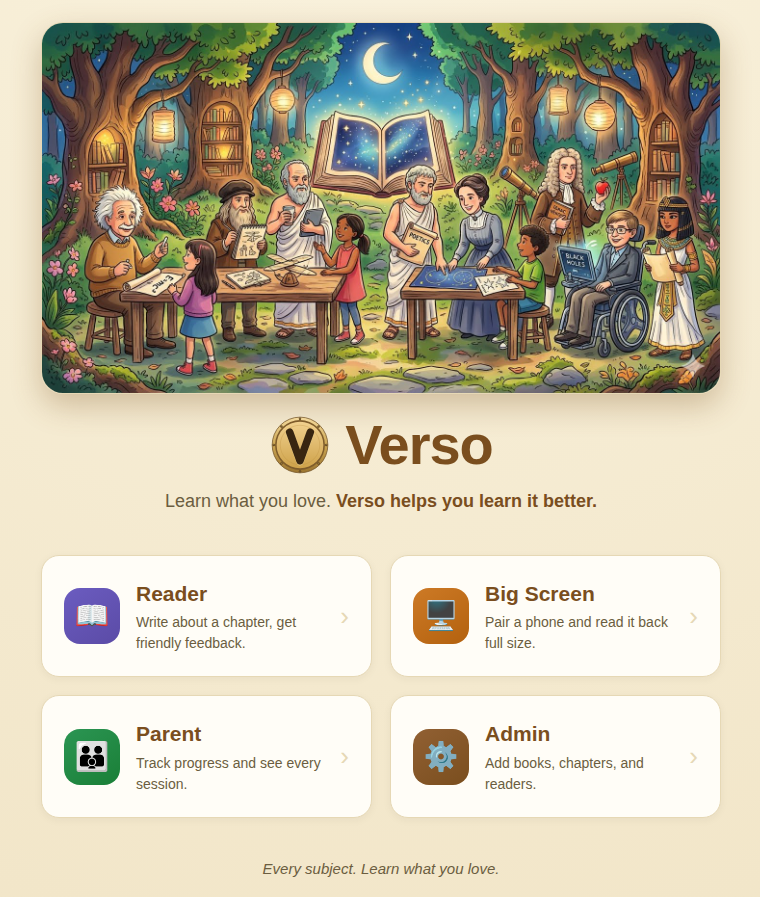
The whole product is four doors. The child only ever needs the first one.
What a session is
My son reads a chapter on paper. Nothing records him. Then he writes about it by hand on notebook paper and photographs the page.
What comes back is a read of his handwriting, his mechanics corrected inline, and a check of what he wrote against the actual text of the chapter. Then a short set of drills built from his own mistakes, and a comprehension quiz written from that chapter.
Ten minutes for him. 169 seconds median for the machine. Twenty-two sessions have gone through it.
The chapter check is the part I could not have built another way. It does not match strings against a summary. It has his sentences and it has the source, and it judges whether that writing belongs to that chapter. I do not know how to write that function and I no longer have to.
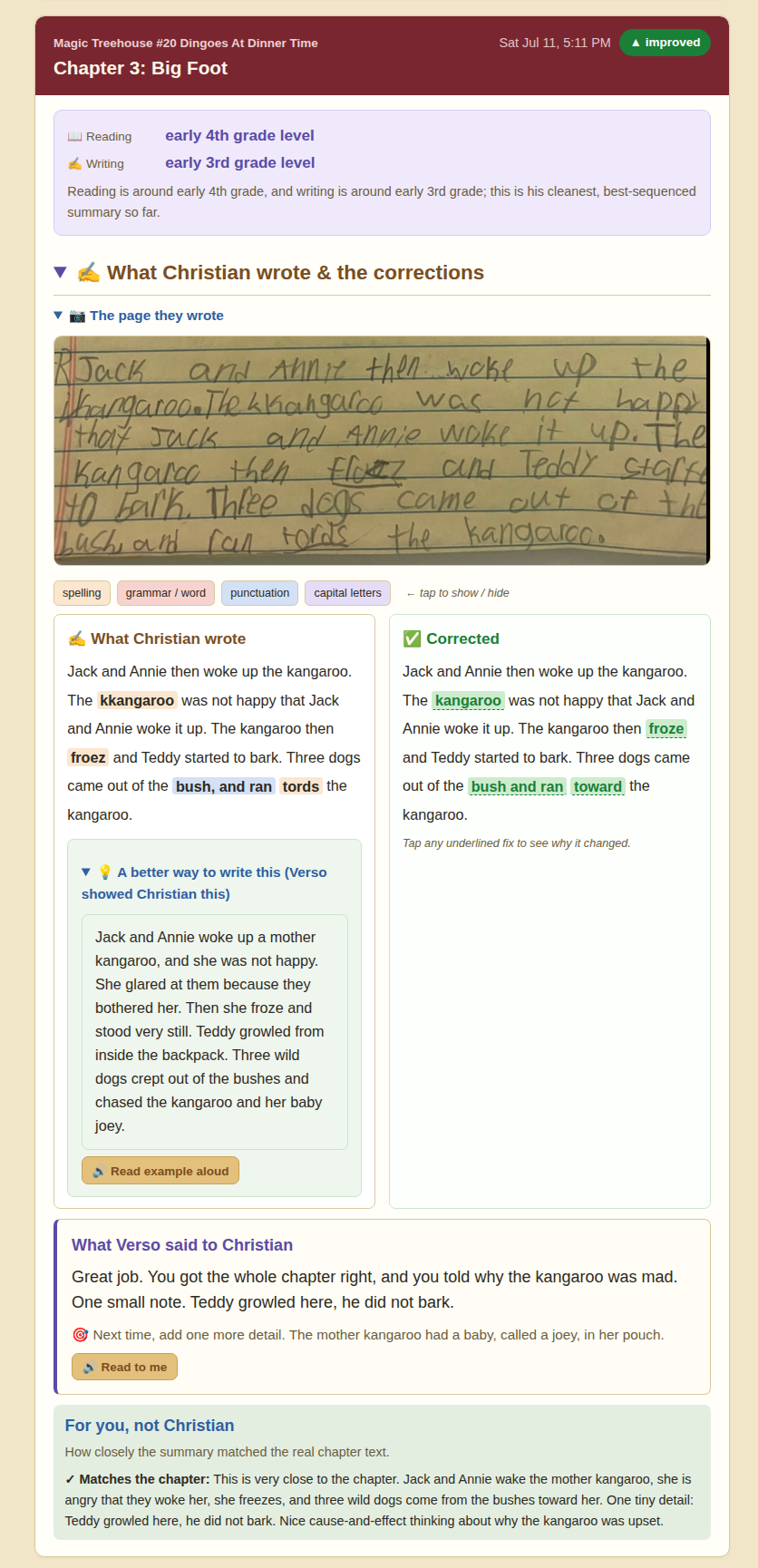
One session, end to end. The child sees everything above the last panel. The chapter-match check at the bottom is addressed to the parent, which is why it is headed differently.
It refuses to read bad handwriting
If the handwriting cannot be read with confidence, Verso does not grade it. It says so, names the words it could not make out, and asks for the page again.
That is deliberate. The gate turns "the scanner failed" into a clear demand: write so you can be read. The younger tier gets no typing option at all, because at that age forming the letters is half of what is being learned.
Older readers are a different case, and I am designing for it now. A teenager who already does their schoolwork on a laptop should be able to type, and the writing coach works the same either way. The reading still stays on paper. That part does not get a tier.
An app that guesses at illegible writing and then grades its own guess teaches a child that the machine is arbitrary.
It has to know the book, and that is the whole problem
Verso cannot tell you whether a summary matches chapter eleven unless Verso has chapter eleven. That is the hard problem in the project, and it is a rights problem rather than a technical one.
Today the work falls on the parent. I photograph the pages of books we own and the system indexes them. Three books, twenty-four chapters, 20,726 words so far. Two Magic Tree House books and one novel my son picked himself. Hunting for a legitimate digital copy of a specific children's paperback is close to impossible, so photographing is what actually happens.
That is a real amount of preparation before a child writes a single sentence, and it is the reason Verso is hard to hand to somebody else. It is the adoption problem, not a rough edge.
Here is what it should be. A child walks into a library, takes a book off the shelf, checks it out, and goes home and reads it. Verso already has the text. The parent does nothing. The child does nothing except read the book they chose and write about it.
What Verso will never do with the text
This is the part that makes the ask reasonable, so I want to be exact about it.
Verso will not show the book to the child. There is no reading view and there will not be one. Not a page, not a chapter, not an excerpt. If the only copy of the book is inside Verso, the child cannot read the book, which is the opposite of the entire product.
The text exists in there for one purpose: to check what a child wrote against what the chapter actually said. The child has to be holding the physical copy for any of this to function. Verso drives people to the book, and a child who has not read it has nothing to submit.
That is not a limitation I am working around. It is the design, and it is why a publisher or a library should be able to say yes to this without giving anything away.
I built the page reader on a local OCR engine first, tuned properly, with downscaling and adaptive thresholding and per-word confidence filtering. On real photographs of a paperback taken by a child it produced gibberish, because real photographs have curved pages and bad light and a thumb in the frame. Vision models read the same pages correctly in about nine seconds. The tuned local pipeline is still there as a fallback for when the primary is unreachable.
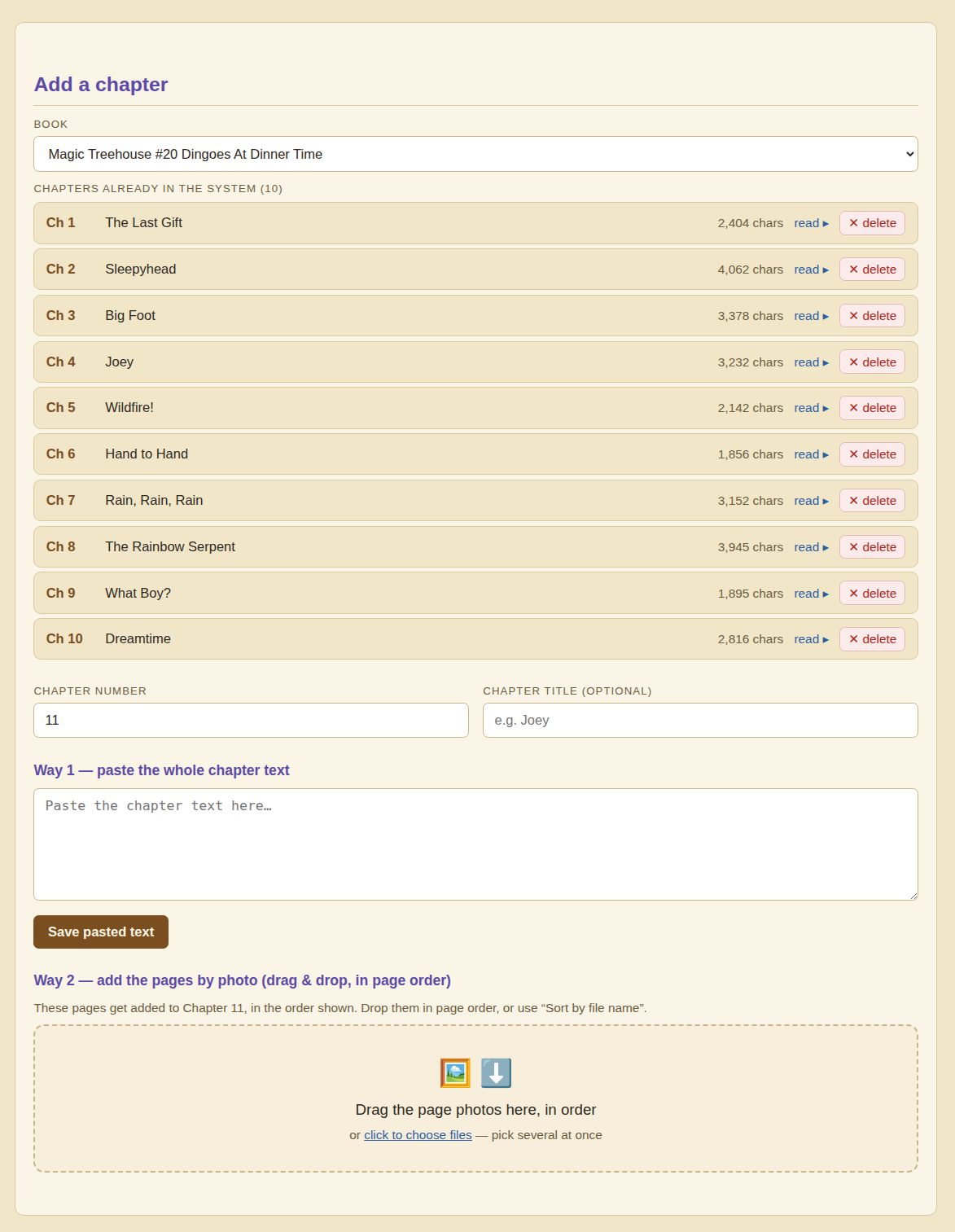
Both routes into the system. Pasting is instant and nobody wants to do it. Photographing a page is what actually happens.
Where the screen earns its way back in
Reading and writing is still the main thing, and it stays on paper. But once the engine worked, assess where the child is, generate work half a step above that, mark it, adjust, it turned out not to care what the subject was.
So I started adding the subjects I wish someone had taught me, and that no school timetable has room for. How money works. How to negotiate, and what to do when the other person will not move. How people think, and how they talk you into things. Strategy. Estimating a number nobody can look up.
This is where screen time comes back, on purpose. A child is not going to learn to negotiate from a paperback, because negotiating needs somebody on the other side of it. These subjects need the back and forth, so they live on the device. That is the trade: the screen leaves reading and writing alone, and in exchange it gets to teach the things a book cannot.
Nine so far. Pattern recognition, math, money, negotiation, psychology, strategy, a vein that turns a video into a lesson, and as of this week Fermi problems.
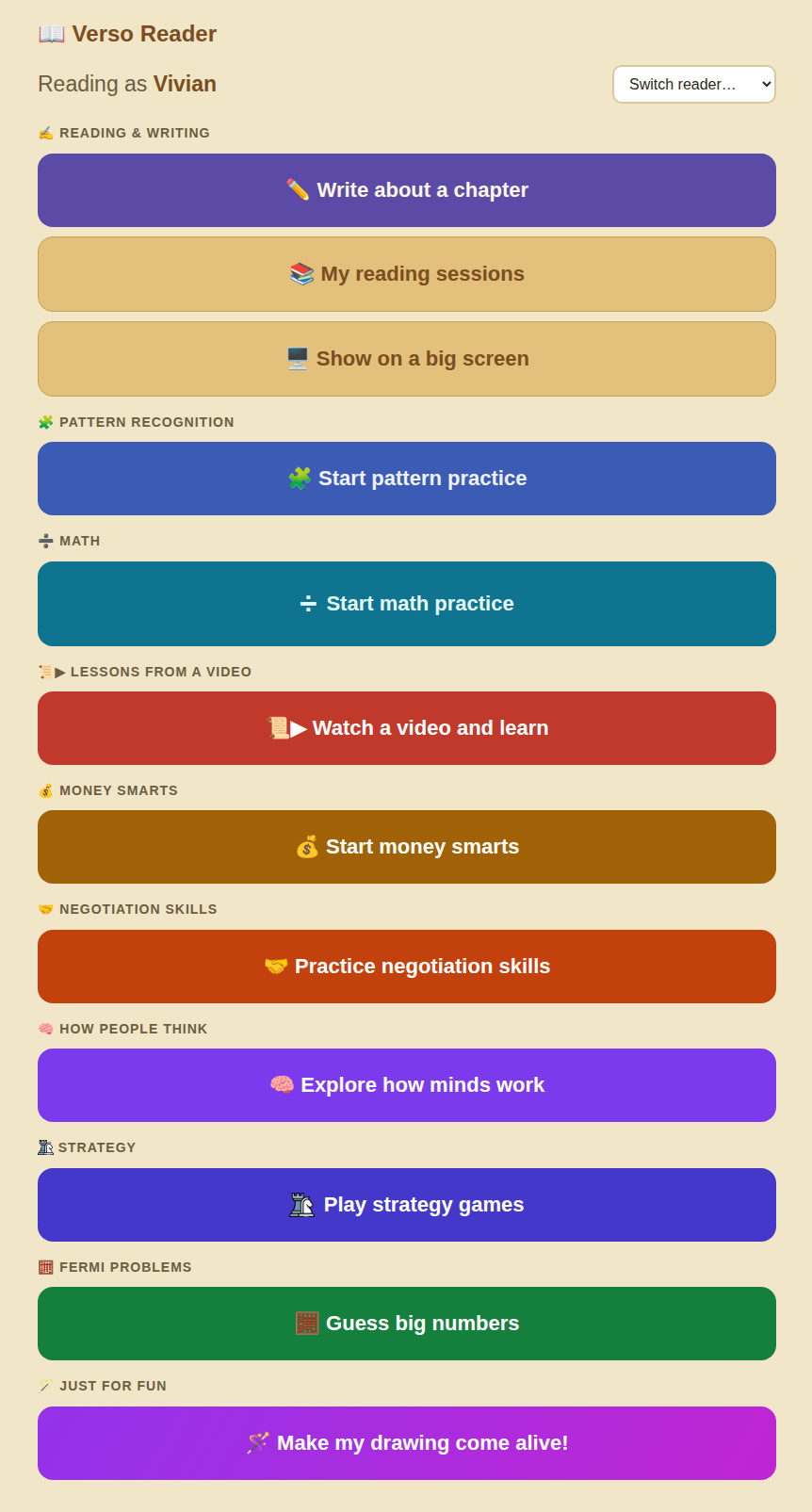
The child's whole interface. Nine subjects and a toy at the bottom, which is there because a nine-subject menu with no toy on it reads like a worksheet.
Fermi problems are the ones nobody can look up. How many slices of pizza does your school eat in a year? You cannot know, but you can guess the pieces and multiply: about five hundred kids, about two slices each, about thirty-six pizza days.
That subject needed its own grader. Every other marker wants the final answer to be correct. This one passes anything within a factor of ten, and fails a bare number with no working behind it even when the bare number is right. I tested it with the correct answer and no reasoning. It said the number might be close, but it could not see how I got there, and the reasoning was what it was grading.
566 items have been generated across all of it: 275 multiple choice, 140 teaching cards, 70 written responses, 37 pieces of work done on paper, and 35 interactive applets, which are small self-contained apps written to spec and dropped into a sandbox so a child can drag a slider instead of reading about one.
Six levels, one kid
I did not expect this part, and it is the reason I would build the whole thing again.
Verso tracks a separate level per subject, because it has to in order to pick the next question.
My son is nominally one sixth grader. Verso holds six levels for him, and they run from fifth grade to sixth. Math is his weakest at a 5. Pattern recognition sits just above it at 5.5. Money, strategy, negotiation and video lessons are all at 6.
A full grade of spread inside one child, and the subject he is furthest behind in is the one his school report says the most about.
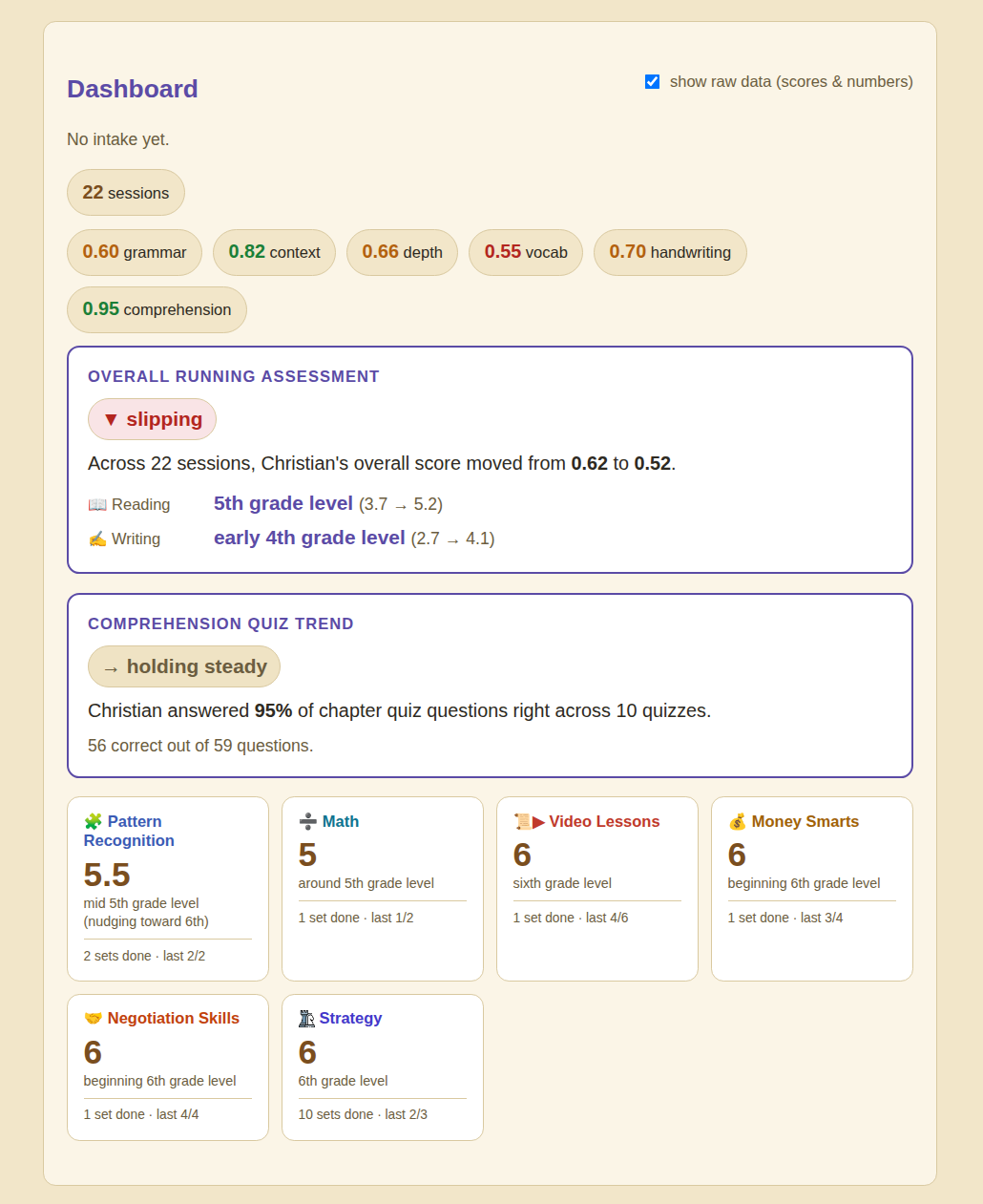
The six numbers that replaced the one. Note the overall marker says slipping while comprehension holds at 95%, which is the kind of split a single grade would hide completely.
None of that is visible from "sixth grade" and "second grade." Nobody at school is wrong for using those labels. A teacher with twenty-eight children cannot hold seven numbers for each of them. But the label averages things that should not be averaged, and once you stop averaging you get the question worth asking: which subject is lagging, by how much, and since when.
That is what I use it for. It is also why the gap between my two kids runs to four grades in some subjects and under two in others, which tells me something their report cards do not.
The parent screen
The children's side is not much use on its own. The parent view is where the work shows up.
It lists every session in the order they were done. For each one: the photograph of the page they wrote, their writing beside the corrected version with each fix tappable for an explanation, the comprehension quiz with every question, every option they were offered, what they picked and what was right, and a note on whether their summary matched the chapter. Everything the child did, rather than a score that summarises it away.
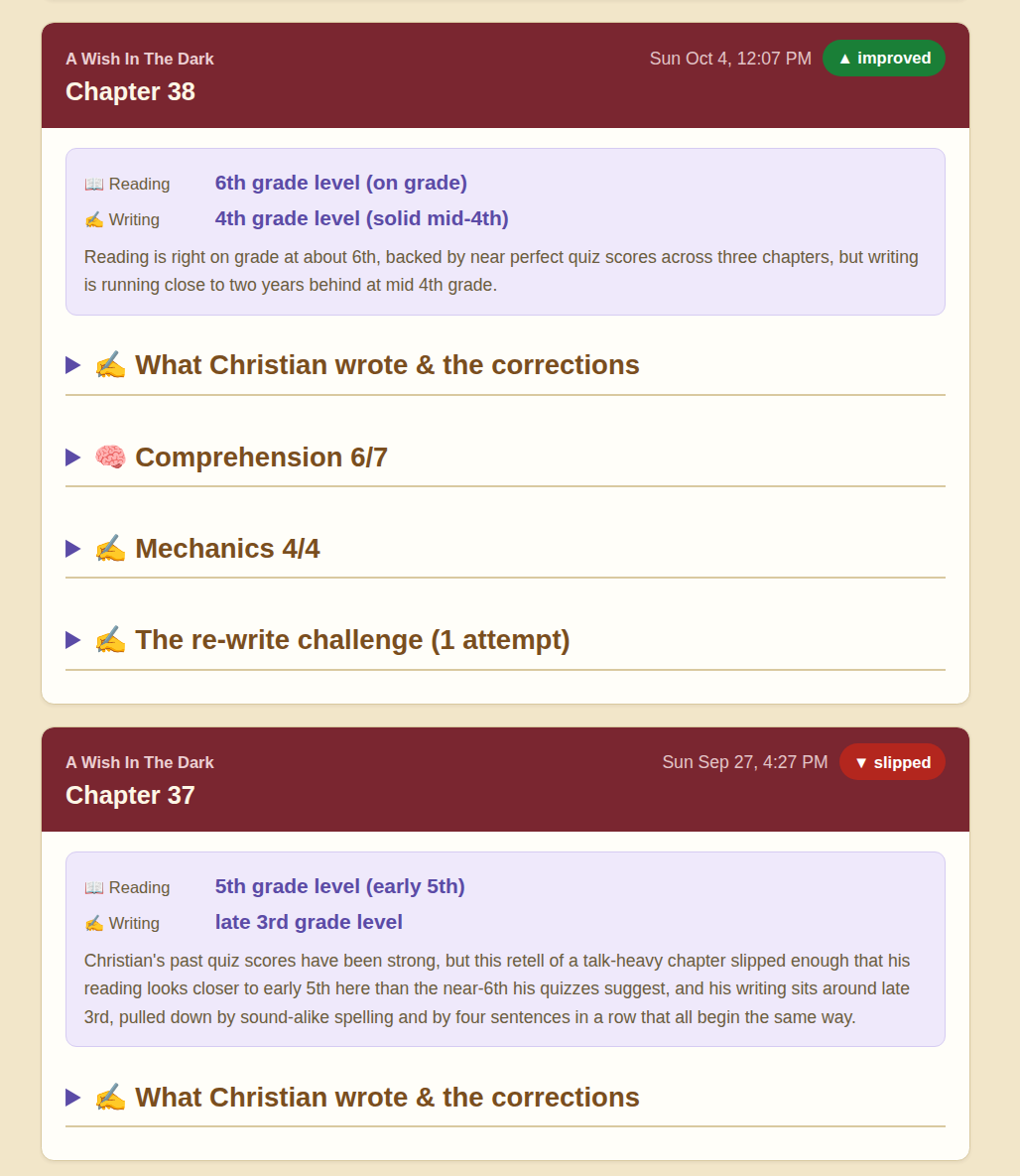
Sessions in order, newest first, each tagged improved or slipped against the one before it. The badge is the only summary on the page and it is comparative rather than absolute.
I rebuilt that screen more times than anything else in the system, always for the same reason. A number on its own is not information. "Six out of seven" tells me nothing I can act on. Six out of seven where the miss was an inference question rather than a recall question, and inference has been the miss three sessions running, tells me what to do on Saturday.
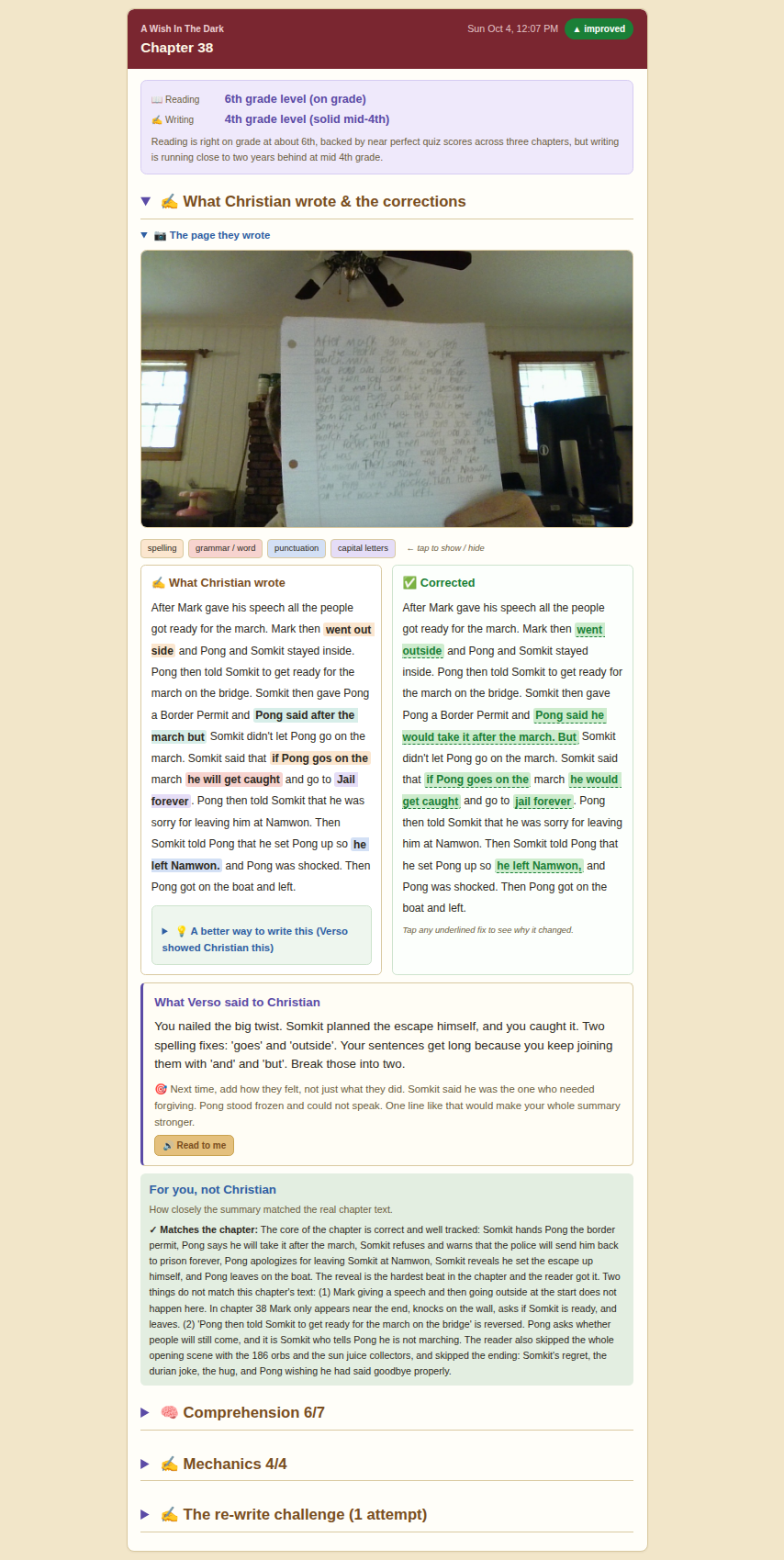
The same screen on a harder book. The chapter-match panel is specific enough to name the two things the summary got wrong and the two scenes it skipped.
The reader could not read
"Draw the next two steps of the pattern, then take a photo" is itself a reading test, and my seven-year-old did not sign up for it. For weeks I was the workaround. She would get stuck, and I would lean over and read the screen to her. The software worked and was unusable without an adult sitting next to her.
Every instruction now has a button that reads it aloud, through a voice running locally on the same machine. That was not on any roadmap. It came from watching one child fail at one screen, which is the only reliable source of that kind of information and the one advantage of having two users.
The same instinct applied elsewhere. A child reads their work back on a monitor by typing one code, because asking a seven-year-old to find a device on a network is not a feature.
What Verso does today
Every screenshot in this post is real use, not a mockup. Two children have been on it most days for months and the numbers are theirs.
- The book is always paper. A real book they chose. Reading does not move to a screen in any tier, and it is not going to. For the younger readers the writing is paper too: a handwritten page, photographed.
- Grammar, phonics, comprehension and reading level, assessed off that photograph, per chapter.
- A check against the actual chapter, so a summary that sounds good but misses the chapter gets caught.
- Nine subjects school does not teach, each with its own level, each picking the next question from that level. This is the only part that happens on a screen.
- A parent view that shows the work, not a score: the page they wrote, every correction with a reason, every quiz question and what they picked.
- Read-aloud on every instruction, so a child who cannot yet read the interface can still use it.
What it does not do yet
There is no book catalog. A chapter gets in because you put it in, by paste or by photograph. That is the thing I most want to fix and the hardest to fix, because it is a licensing problem rather than a technical one.
The typing tier for older readers is designed and not built. Right now the writing side assumes a handwritten page, which is right for a seven-year-old and wrong for a fifteen-year-old who does everything else on a laptop.
Nine subjects is not a curriculum. The level estimates are calibrated against a small number of children and they get better as that number grows. There is no mobile app yet. The list of things I know are wrong with it is longer than this post.
What I am actually asking for
If you work at a school, a library, or a publisher of children's books, I want to talk to you.
The thing standing between Verso and being useful to anybody outside my house is chapter text. Not to display, not to distribute, not to sell. To check a child's writing against.
What that unlocks: a child borrows a book from your shelves, takes it home, reads the physical copy, and writes about it, and nobody had to photograph twenty pages first. The library lends the book it already lends. Verso never becomes a way to read it.
I will put that in writing in whatever form your legal people want. No reading view, no export, no excerpt longer than a quoted phrase in feedback to the child, and the text never leaves the installation it was licensed to.
I know the rights usually sit with the publisher rather than the library, and that a library's own ebook licences do not let it pass anything on. If you are at a library and this sounds useful, the most valuable thing you can do is tell me which publishers your young readers actually borrow, or introduce me to someone there.
And a small number of families
I would rather have ten families who tell me what is broken than a thousand who sign up once and never come back. If you have a child who reads, or who will not read, write to me and say the age and what they are reading now. That is all I need to get you started.
Either conversation, same address: info@openred.space.
The original requirement has not changed since the first week: a child picks a book, and the software works on that book. Everything else in here was discovered by watching two of them use it.
Verso runs on top of a service I built that puts an HTTP endpoint in front of a coding agent. If you are interested in the engineering rather than the education, the latency problem it created is written up separately in A Seven-Year-Old Will Not Wait for Your Agent.
More from the blog
- Your Menu Needs an API
- The Interface Was the Moat
- A Model Called Jev Just Launched to Do What I Had Running in April
- A seven-year-old will not wait for your agent
- I don't call the agent for decisions. I call it for sentences
- The real invention was turning a coding agent into a webservice
- Your agents have amnesia, and it is costing you